Connect QuickBooks to Claude in 2 minutes
Pick the setup that matches the Claude you use. Both finish with you asking "What's my revenue this month?" and getting a real answer from your books.
Pick your Claude
Before you start
- A Kaizen plan — Starter is free. Pick one on the pricing page.
- Admin access to the QuickBooks Online company you want to connect.
Track A — Claude Desktop or claude.ai (web)
About 2 minutes. Connect QuickBooks once, then paste a single connector URL — no config files.
Go to api.kaizencfo.com/oauth/connect, click Connect to QuickBooks, and authorize Kaizen. This is the one step where you prove you own the books.
On the success page, find the “Connect on claude.ai (web)” block and copy the URL. It looks like:
https://api.kaizencfo.com/mcp/your-company-a1b2c3?token=…In Claude Desktop (or claude.ai in your browser), go to Settings → Connectors → Add custom connector. Paste your URL into the Remote MCP server URL field, give it any Name (e.g. Kaizen QBO), and leave OAuth Client ID and OAuth Client Secret empty — the key is already in the URL.
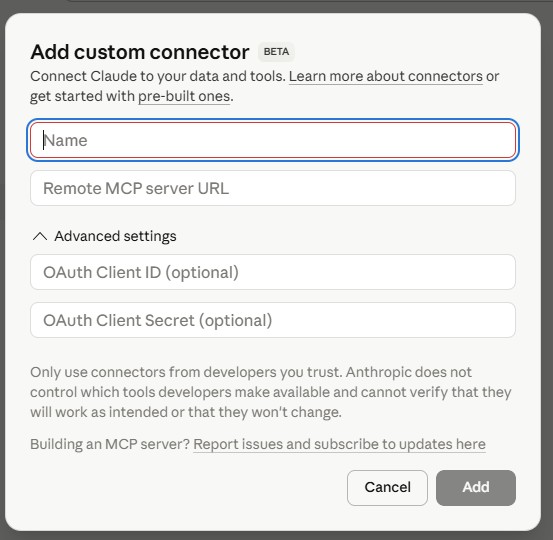
Connecting more than one QuickBooks company? Connect each company at /oauth/connect — every one gives you its own URL with a unique label and key. Add each as a separate connector and keep them all connected at once.
Start a new chat, click the + menu, and toggle the Kaizen connector on for this chat. Then ask:
- "What's my revenue this month?"
- "Show me all unpaid invoices over $1,000."
Troubleshooting
- "A server with this URL already exists." — a previous add (even a failed one) claimed that URL. Reconnect at /oauth/connect to get a fresh URL with a new label.
- Connector shows "tools not available" or keeps disconnecting. — the URL was likely truncated when pasted (the
?token=…tail is required). Copy it again in full, or reconnect for a new one. - Popup blocked during step 1. — allow popups for
api.kaizencfo.comandintuit.com, then retry the connect.
Track B — Claude Code or Cursor
About 3 minutes. You'll get an API key you paste into your MCP config.
Go to api.kaizencfo.com/oauth/connect and click Connect to QuickBooks.
Sign in to QuickBooks and grant Kaizen access.
You'll land on a success page with a copy-paste block that contains your API key and the MCP config. Paste the whole block into a Claude Code prompt and hit enter — Claude writes the config file for you.
Your API key is shown once. If you lose it, reconnect at /oauth/connect and a new key is generated.
Close and reopen so Claude loads the new MCP server.
- "What's my revenue this month?"
- "Pull the P&L for Q1 2026."
Using Cursor?
Same API key, same MCP config, different file path:
- macOS:
~/Library/Application Support/Cursor/User/mcp.json - Windows:
%APPDATA%\Cursor\User\mcp.json
Troubleshooting
- MCP server fails to start. — make sure Node.js 18+ is installed. The
npx kaizen-qbo-mcp-servercommand needs it. - "Invalid or revoked key." — reconnect at /oauth/connect to generate a fresh key.
- "Plan doesn't include this." — your tier doesn't allow that operation. Upgrade on the pricing page.
Try it
Analyze & report
- "What's my revenue this month compared to last month?"
- "Who are my top 10 customers by revenue?"
- "Show me the A/R aging — anything over 90 days?"
Find & investigate
- "Show me all unpaid invoices over $1,000."
- "List all transactions from vendor ABC Services in March."
- "Pull the balance sheet and flag anything unusual."
Create & record (Professional and Premium plans)
- "Create an invoice for Acme Corp — 10 hours consulting at $150/hr."
- "Record a journal entry: debit Office Supplies $500, credit Checking $500." (Premium)
- "Post a payment of $2,400 from Smith & Associates against Invoice #1045."
Plans
Starter (free, 100 reads) · Essentials ($99) · Professional ($199, adds writes) · Premium ($399, adds journal entries + API-only QBO fields + bulk ops). Full comparison and signup on the pricing page.
What's protected
- Tier scopes. Starter and Essentials are strictly read-only. Writes require Professional+. Journal entries and deletes require Premium.
- Audit tags. Every write adds a
[kaizen:<keyId>:<timestamp>]suffix to the PrivateNote in QuickBooks, so you can always trace a row back to the key that wrote it. - Usage & audit log. Every call is logged. Check your balance anytime by asking Claude: "Check my Kaizen API usage."
- Inference-only. Your QuickBooks data is sent to Anthropic for inference. It's never used to train models.
Disconnecting
You can disconnect your QuickBooks company at any time from within QuickBooks itself: Settings → Manage apps → remove Kaizen. Or email support@kaizencfo.com and we'll handle it.
Support
Reach us at support@kaizencfo.com or +1 786 882 8169.